ブログ

目次

    分類

    関連するブログ

    4K vs 1080p PTZ Camera: How to Choose for Outdoor Security
    How Do I Choose a PTZ Thermal Camera for Outdoor Security
    Who Makes the Best PTZ Camera for Outdoor Security Projects
    小規模ビジネス向けPTZカメラセキュリティシステムにいくら費用をかけるべきか
    長距離サーマルレーザーPTZカメラのメーカー選びに関する究極ガイド

    How To Install a PTZ IP Camera Outdoors: Complete Guide

    How To Install a PTZ IP Camera Outdoors Complete Guide

    To install a PTZ IP Camera for a 150 m-plus outdoor observation project, prepare the site record, secure the camera, connect documented power and network interfaces, configure PTZ control, and complete an acceptance test. The sequence applies to power facilities, substations, roads, patrol vehicles, border sectors, forest-fire prevention, oilfields, and remote infrastructure.

    An installation is complete when the operator can view the sector, use approved PTZ commands, recall presets, record streams, and hand an event to the control room.
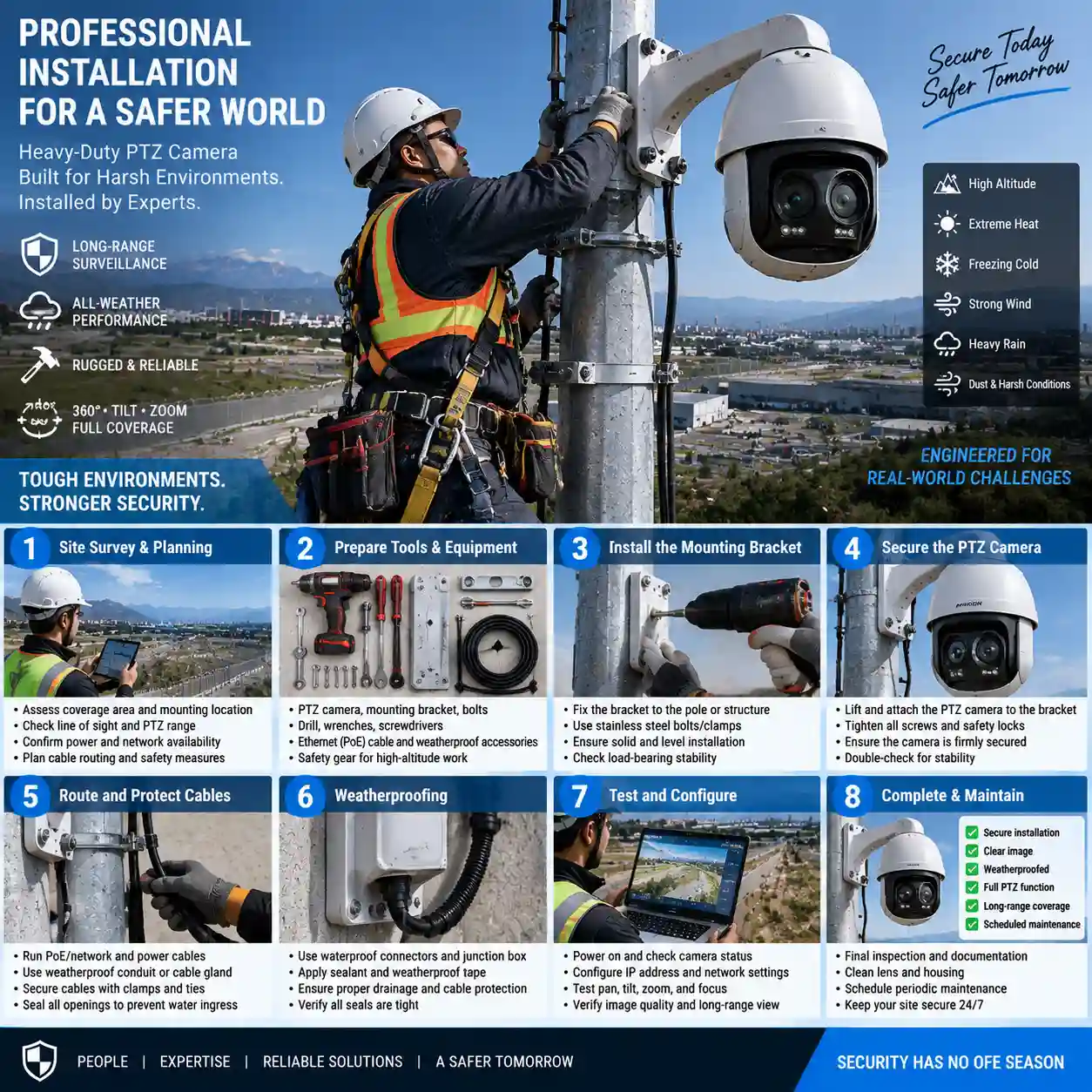
    Step-by-step outdoor PTZ IP camera installation and mounting guide for long-range security

    What Should You Prepare Before Installing a PTZ IP Camera?

    Start with an installation record.

    Installation stage Key input Acceptance evidence
    Site survey Sector, sightline, mounting, weather Approved site drawing
    Connection Power, network, protocol Live stream and command test
    PTZ setup Presets, routes, return position Recorded preset views
    Commissioning Recording, handoff, weather functions Signed acceptance sheet

    Define the Observation Sector and Mounting Point

    Record the target sector, 150 m-plus scope, line of sight, terrain, mounting height, weather, and operator action. Mark each repeat view on a site drawing before selecting the bracket position.

    State the control-room handoff, live view, event view, recording channel, preset, and response action. These inputs guide camera orientation and PTZ programming.

    Confirm Equipment, Tools, Power, and Network Inputs

    Prepare model documentation, mounting hardware, cable protection, test instruments, power, network path, platform, protocol, recording plan, and acceptance views. Confirm local structural and electrical requirements.

    PoE belongs in the confirmation list. Ask the supplier to state the model’s PoE standard, power class, budget, switch or injector requirement, cable route, and startup load. The Shuoxin WL-TX30-HD-RCX record lists wide-range DC12V vehicle input; it does not verify PoE for that model.

    How Do You Install the PTZ Camera Hardware?

    Hardware installation starts with the support structure and ends with a protected, serviceable cable route. The camera must remain stable during PTZ movement.

    Survey the Pole, Mast, Vehicle, or Observation Structure

    Inspect the mounting surface, load path, vibration, wind exposure, drainage, access, and maintenance position. A fixed observation point and a patrol vehicle have different movement and power conditions. Record the structure, bracket orientation, cable entry, and service space in the installation drawing.

    For vehicle deployment, confirm roof mounting, DC supply, vibration provisions, and communications. The WL-TX30-HD-RCX lists optional vehicle shock absorbers.

    Secure the Camera and Protect Cable Routes

    Align the bracket with the planned sector, install specified fasteners, and apply strain relief. Protect connectors from water, pull, dust, and abrasion. Leave a serviceable cable route.

    Set initial orientation against the site drawing and confirm nearby structures stay outside programmed views.

    How Do You Connect Power and Network Interfaces?

    Confirm Power Input and PoE Status

    Check the model input, supply protection, connector, cable route, and available power before startup. For a vehicle installation, the WL-TX30-HD-RCX reference configuration lists wide-range DC12V vehicle input. The same record does not confirm a PoE interface.

    When the project specifies PoE, request written confirmation for the exact model. Record the standard, class, power budget, switch or injector, cable calculation, and startup behavior. Use a design that the supplier and integrator can test.

    Connect the Camera to the Network and Platform

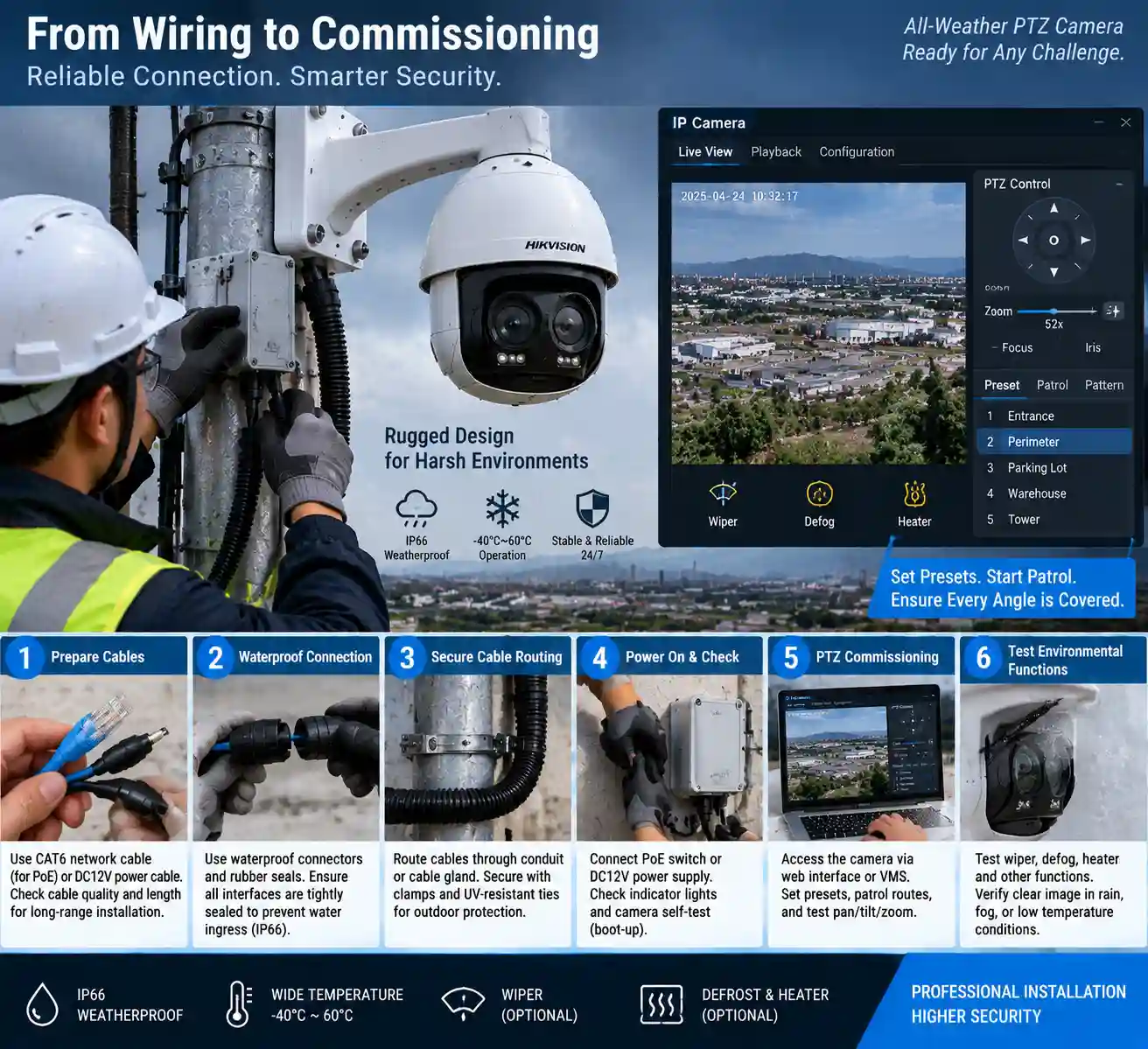
    Assign network details according to the approved plan. Label cables and ports, then verify link status, stream access, time settings, permissions, and recording destination.

    The WL-TX30-HD-RCX lists ONVIF Profiles S/G, RS485, and H.265, H.264, and MJPEG. Add it to the video platform, test live video, and send PTZ commands through the intended path. Video access and PTZ control require separate tests.

    How Do You Configure PTZ Control After Installation?

    Configuration turns the physical orientation into a repeatable patrol and response procedure. Use the sector drawing and preset list as reference.

    Verify ONVIF or RS485 PTZ Commands

    Test pan, tilt, zoom, stop, preset recall, and return commands from the approved platform. If RS485 is used, verify wiring, address, protocol, and response with the integrator.

    The WL-TX30-HD-RCX lists 360-degree endless pan and +90 to -90 degree tilt. Installed limits depend on mounting, cable route, platform commands, and site review.

    Set Presets, Tracking Paths, and Recording Views

    Name presets after the site sectors. Set return position, scan order, dwell time, and manual override. Record each view and confirm return after an event.

    The WL-TX30-HD-RCX lists 256 presets and eight tracking paths. Use those values as model-specific fields. The サーマルカメラDRI範囲ガイド provides shared acceptance terminology; site testing remains required.
    Outdoor PTZ camera weatherproof cable wiring and PTZ preset commissioning interface

    Which Outdoor Conditions Must You Check During Commissioning?

    Commissioning connects the installed hardware to weather, maintenance, communications, and operator checks. Record conditions and results for each acceptance item.

    Check Enclosure, Window, Temperature, and Weather Functions

    The WL-TX30-HD-RCX lists IP66, -35 to +55 degrees C, a wiper, heated glass, defrosting, and defogging. Compare these data with local rain, dust, wind, temperature, drainage, and service access. Test each included window function from the control path.

    Record installed position, weather, function, and result in the commissioning sheet.

    Test Vehicle Vibration and Remote-Site Communications

    For vehicle projects, test DC12V connection, mounting stability, selected shock absorbers, cable protection, and communications. For fixed remote sites, test network path, stream continuity, recording, and playback.

    Use the sectors, presets, commands, and recording views defined during preparation.

    How Does Installation Change by Outdoor Application?

    The sequence remains consistent; field checks follow the application and mounting point.

    電力施設、変電所、油田

    Map equipment sectors, access routes, sightlines, weather, power continuity, network path, and acceptance views. Confirm the mounting structure and cable route before setting presets.

    Roads, Patrol Vehicles, Borders, and Remote Areas

    Road and border installations need direction-based presets, terrain notes, communications coverage, and operator handoff. Patrol vehicles add DC power, vibration, shock, cable protection, and mobile network checks.

    Forest-Fire Prevention Areas

    Forest-fire prevention installations require a clear observation point, sector boundaries, weather exposure, and a response path. The thermal PTZ cameras for forest-fire prevention article provides related context. Keep the selected model and acceptance views project-specific.

    What Should You Test After Installing a PTZ IP Camera?

    Use a six-part acceptance checklist:

    1. Power and startup: confirm the documented input, protection, boot sequence, and stable operation.
    2. Live video: verify the thermal or visible stream, timestamp, permissions, and recording destination.
    3. PTZ commands: test pan, tilt, zoom, stop, preset recall, and return commands from the approved platform.
    4. Routes and tracking: test the programmed presets, tracking paths, dwell times, and manual override.
    5. Environmental functions: test the documented wiper, heated glass, defrosting, and defogging functions where included.
    6. Handoff and records: verify control-room display, event recording, playback, and the completed acceptance sheet.

    Store the result with model, site, date, weather, configuration file, and review sign-off.

    Conclusion: Turn the Installation Record Into a Working PTZ System

    An outdoor PTZ IP camera installation succeeds when site geometry, mounting, power, network, PTZ commands, presets, recording, environmental functions, and acceptance evidence agree. The 150 m-plus scope belongs in the project record, with performance assessed through the selected model and site test.

    Shuoxin’s WL-TX30-HD-RCX reference configuration lists a 640 x 512 uncooled vanadium oxide thermal detector, 30-150 mm thermal lens, 1920 x 1080 visible channel, 52x optical zoom, 360-degree endless pan, 256 presets, eight tracking paths, IP66 protection, and wide-range DC12V vehicle input. Review the 二波長長距離熱画像PTZカメラ data, then submit the mounting, power, network, platform, vehicle, and acceptance requirements through Shuoxin’s PTZ installation contact.

    よくあるご質問

    Q1: What do I need before installing a PTZ IP camera outdoors?

    A: Prepare the target sector, 150 m-plus observation scope, line of sight, mounting point, weather conditions, power, network, platform, control protocol, recording plan, and acceptance views. Confirm the selected model’s interfaces and environmental data before installation.

    Q2: Can a PTZ IP camera use PoE?

    A: PoE use depends on the exact model and power design. Confirm the PoE standard, class, power budget, switch or injector, cable path, startup load, and environmental limits with the supplier. The WL-TX30-HD-RCX record lists wide-range DC12V vehicle input and does not confirm PoE.

    Q3: How do I connect PTZ control after mounting the camera?

    A: Connect the documented network or RS485 interface, add the camera to the approved platform, and test pan, tilt, zoom, stop, preset, and return commands. The WL-TX30-HD-RCX lists ONVIF Profiles S/G and RS485; the installed platform still requires a command test.

    Q4: What should I test after installing a long-range PTZ camera?

    A: Test power and startup, live thermal or visible video, PTZ commands, presets, tracking paths, recording, playback, environmental functions, and control-room handoff. Record the model, site, date, weather, configuration, and acceptance results.

    Q5: Which site details should I send to a supplier before installation?

    A: Send the sector map, distance scope, target area, terrain, mounting structure, weather exposure, power source, network path, control platform, recording requirement, vehicle details, PoE requirement, preset plan, and acceptance views. These details let the supplier review the installation configuration against the site. The selected model documentation and the site’s approved electrical and network design govern power and data connections. Record cable identity, polarity, protection, and connector condition before startup.

    共有:

    Facebook
    Twitter
    LinkedIn
    4K vs 1080p PTZ Camera: How to Choose for Outdoor Security

    相談して問題を見つけます

    便利なコミュニケーションの旅を始めてください。