
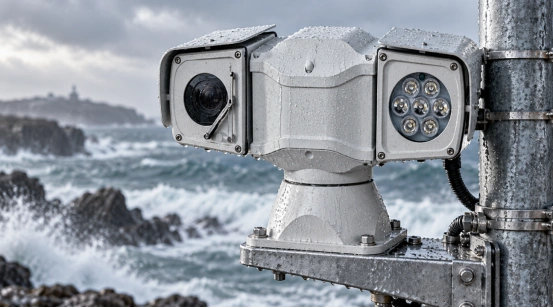
A PTZ camera’s life depends on a bunch of different things. How it is built matters a lot. The local weather and the power supply are huge factors. Your network setup and daily care also play a big part. A smart PTZ IP camera can run great for years. But its pan-tilt mechanism, lens, housing, and software need to match the actual site. If they don’t, that exact model might break down super fast. Endless shaking or really wet air makes things wear out quicker. Bad power or moving too fast hurts the machine, too.
This guide points out which parts break first. It explains the bad conditions that ruin them early. At the end, it gives you a handy checklist. You can use it to pick and care for your PTZ system.
How Long Do PTZ Cameras Typically Last?
There is no single lifespan that fits every PTZ camera. Think about an indoor camera. It sits in a nice, cool room and does an easy job. Now, compare that to a camera stuck on a pole near the sea. Patrol cars and dirty factories push the gear much harder. Non-stop pan and tilt spinning puts a ton of stress on the gears. But if you just call up a preset spot now and then, it goes much easier on the machine.
A PTZ system breaks down in pieces. The main camera module might still take great video. But at the same time, its zoom or autofocus might stop working. Network parts usually stay fine for a long time. An outdoor seal, a wiper, or a heater could fail first. Good daily care keeps the whole product running. You just swap out the broken parts as they wear down.
When you check out a smart PTZ IP camera, look at its rated operating temperature. You should also check the enclosure protection. Review the power input, rotation design, control interfaces, and service support. These details guess its true life a lot better. A plain warranty period simply does not tell the full story.
Which PTZ Components Wear Out First?
Different pieces age at totally different speeds. If you know what breaks first, you can plan your checks. It also helps you pick a model that fits your daily work.
Pan and Tilt Mechanism
The pan and tilt unit holds motors, gears, bearings, position sensors, and control boards. Fast patrols and non-stop turning add a lot of mechanical stress. Shaking from a vehicle and heavy extra parts make it worse. You can spot early warning signs easily. Listen for weird noises or look for visible shaking. The camera might move slowly, spin past its mark, or stop before it reaches the saved preset.
Endless horizontal rotation is great if you need to see the whole area. But this means your wires and the slip-ring quality must be very good. A system using fixed presets moves much less. It stays healthier than a camera that scans non-stop all day.
Camera and Lens Module
The visible camera, image sensor, zoom lens, autofocus, and infrared parts all get old. High heat and using them over and over wears them down. You might see the camera struggling to focus. A slow zoom, dirty image noise, or losing details at night usually means a lens issue. The PTZ motor might still work perfectly during this.
A dual-spectral unit brings in a thermal imaging module. The visible and thermal sides might need different resolutions and frame rates. Their calibration needs are different, too. You must keep the optical window and the thermal window very clean. Make sure to use the right cleaning method for each surface.
Outdoor Protection Parts
Outdoor housings use seals, cable glands, glass, heaters, defogging elements, and sometimes a wiper. Sun exposure, salty air, and dust hurt these parts. Water drops and freezing weather slowly break them down. A camera might turn on fine. But water inside or a cloudy window will ruin the video quality.
What Affects Smart PTZ IP Camera Lifespan?
The place you install the camera is super important. It matters just as much as the tech specs. Think about these things before you plan to buy a replacement.
Power Quality and Protection
Voltage drops make a camera turn off and on. They also cause motors and heaters to run badly. Power surges from close lightning can burn the network boards. Long outdoor cables can bring surges, too. You must use the exact DC or PoE supply. Add good fuses, surge protection, and a solid ground wire. Check the power level while the motor, heater, or light is working. Test it again when the camera is doing nothing.
Temperature, Moisture, and Dust
High heat kills electronic parts fast. Cold weather makes lubricants thick. It hurts accessory batteries and slows down the startup. Wet air and water reach wire plugs if the seals are broken. Pick a housing and a temperature range that match your real location. Also, shut the cable holes tightly after you fix the device.
Vibration and Movement
Car roofs, bridges, tall towers, and factory machines shake a lot. This shaking goes straight into the mount. A shock-absorbing bracket and the right screws help. A protected cable loop removes stress from the housing and ports. Do not put a precision PTZ head on a wobbly wall that shakes on its own.
Network and Software Maintenance
A smart PTZ IP camera needs the switch, recorder, VMS, storage, and remote network to work well. A jammed network slows down your commands. This makes people press the controls too many times. Check the firmware, passwords, time settings, and backups often. Write down the IP address, ONVIF profile, stream settings, and your PTZ presets. Doing this helps you fix or replace the camera really fast.
Workload
Things like night lights, heaters, wipers, and deep zoom run a lot. Tracking targets non-stop adds more work hours. Try to set up smart motion rules and scheduled patrols. Pick event recording settings that fit the spot. A camera does not need to spin all motors at full speed. A slow, easy patrol often gets the job done.

How Can You Extend the Life of a PTZ Camera?
First, match the installation to the weather. Pick the right IP protection level and temperature range. Choose a steady wall, a good power supply, and a clean network path. Keep the camera far away from tree branches, smoke pipes, and water sprinklers.
During routine checks, look closely at the housing, seals, wire plugs, mount, and cable loop. Clean the lens or thermal window with safe, approved wipes. Test the pan, tilt, zoom, and autofocus. Check the presets, tracking, alarms, and night lights. Try to hear any weird motor noises. Watch to see if the camera stops at its saved spots right on the dot.
Back up your files before adding new firmware. Check your hard drive health and the stream profiles. This stops the recorder from saving huge videos for no reason. Swap out old wipers, broken wire parts, and bad seals fast. Do this before water gets inside. These simple jobs protect the imaging module. They also stop sudden breakdowns.
What Should You Check Before Buying a Smart PTZ IP Camera?
Ask about the operating temperature range and enclosure rating. Check its power needs, rotation range, preset accuracy, and control methods. Make sure the VMS works with the camera’s ONVIF profiles. If not, check if an SDK is there for the tools you need. See if the product supports Web and RS485 control. This helps a lot when fixing things locally or using older gear.
For outdoor and mobile jobs, pick features that match the rough spot. IP66 protection, a heater, or defogging glass help greatly. A wiper, strong shock absorbers, and a wide-range DC input make fixes easier. A thermal model also needs clear details. Ask for the detector resolution, lens options, calibration steps, and stream behavior.
على سبيل المثال كاميرا PTZ للتصوير الحراري ثنائي الطيف بعيد المدى packs great features. It lists a 2MP visible camera and a 640 × 512 uncooled thermal detector. It has IP66 protection and a 360-degree endless pan. It offers ONVIF and SDK support, along with Web or RS485 control. It uses DC12V vehicle power. It also brings heated glass, defogging tools, and a wiper. These points prove it can handle a long-term deployment.
How Does Shuoxin Support Long-Term PTZ Deployment?
شوكسين makes many types of cameras. They build vehicle, highway, marine, heavy-load, dome, and long-range thermal PTZ equipment. Their gear covers visible and thermal imaging. They provide ONVIF/SDK integration and Web and RS485 control. They also supply solid vehicle power and tough outdoor protection.
They build cameras for railways, substations, and border defense. They help with forest-fire prevention and coastal monitoring. The security camera team can check the interface, mounting, and weather needs for any project.
الأسئلة الشائعة
Q1: How many years does a PTZ camera usually last?
A: There is no exact number. Its service life changes based on movement workload. It also depends on weather, power quality, installation, and maintenance. A camera with replaceable outdoor parts can last years with planned service.
Q2: Does outdoor installation reduce PTZ camera lifespan?
A: Yes. Being outside adds heat, moisture, dust, UV rays, wind, and wild vibration. But you can manage this. The correct enclosure, sealed cable entry, surge protection, and regular checks help a lot.
Q3: Which PTZ component usually needs maintenance first?
A: The first fix might be a wiper, seal, or heater. It could be a connector, lens, or the moving assembly. The true answer depends on your site and the camera’s movement schedule.
Q4: Can firmware updates extend the life of a smart PTZ IP camera?
A: Yes. Firmware can boost compatibility, network security, and fault handling. Just make sure the update fits your exact model. Back up settings and follow the supplier’s rules before you update.
Q5: What matters more for PTZ lifespan: IP rating or maintenance?
A: Both matter highly. IP protection stops water and dust. Routine maintenance catches worn seals, dirty windows, loose mounts, and bad movement before they cause big trouble.