
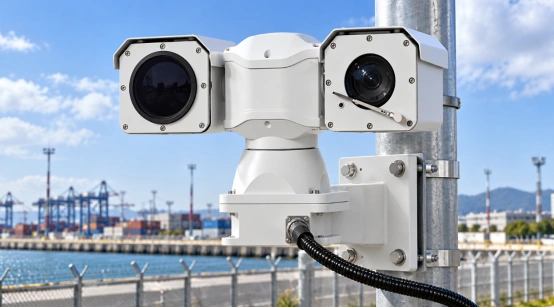
PTZ cameras rely on a mix of cords for power, video, and network control. The right setup really depends on the exact camera you buy. Cable length matters a lot, too. You also need to think about what the user actually wants to do. Take a dual PTZ thermal camera, for example. It packs two picture channels. Because of this, the wires have to carry both normal video and heat-vision video. Plus, those same cables must tell the camera how to pan, tilt, zoom, and trigger alarms.
This guide breaks down how these connections really work in the real world. Read it to help plan out your next IP, RS485, fiber, or car-mounted system.
What Connections Does a PTZ Camera Need?
Most PTZ cameras ask for four basic things. First, they need power. Next, they need a way to send video. Third, they need control signals. Finally, they need to work well with the rest of your system. Sometimes, a camera packs all these jobs inside one single Ethernet cord. Other times, it uses totally different wires for every single task.
Pouvoir
You can get power from a DC plug or regular AC power. You can also get it from a PoE switch or even a car battery. You should always check the camera’s voltage rules before doing anything else. Outdoor PTZ models often pack built-in heaters, window wipers, or bright night lights. Naturally, these extra parts eat up a ton of electricity when they turn on. Cameras mounted on cars deal with super bumpy roads. They also face weird power drops. Because of that, you absolutely must use the exact right DC input. Safe fuses are a big deal, too.
Also, remember to leave a little bit of loose cable near the mounting bracket. That extra bit of slack lets the camera spin around without snapping the wire.
Vidéo
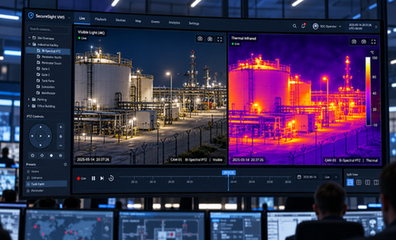
Video easily travels down an Ethernet cord as a pure IP stream. But it can also run through older coaxial wires. Fiber optics and Wi-Fi work, too. A dual PTZ thermal camera usually spits out two separate video streams. One stream shows you a regular, everyday picture. The other stream hands you the thermal, heat-vision view. The camera software lets you watch both at once. Or, you can just view them one by one.
PTZ Control
PTZ commands are simply instructions. They tell the tiny motors to move the lens up, down, or side to side. These commands also fix the zoom and clear up the focus. IP cameras get these orders straight over the network line. Older models still rely on RS485 wires. That classic serial setup links older control keyboards directly to the camera base. It works with old DVRs, too.
System Integration
ONVIF is basically a translator. It helps your IP camera talk nicely with different video recorders and software brands. An SDK is a bit different. It lets you build very custom controls or set up smart tracking rules. You should always check the ONVIF and SDK features on your exact camera model. Do this way before you start building your whole system.
How Are IP PTZ Cameras Connected?
These days, nearly every new PTZ camera runs on an IP connection. The setup is pretty simple. You just plug the camera right into a network switch. A standard Cat5e or Cat6 cord gets the job done. Once plugged in, the switch passes the video straight to your PC. It passes the control commands to your recorder, too.
Ethernet With Separate Power
The Ethernet cord easily carries your video, sound, and PTZ commands. Meanwhile, a totally different wire brings the actual electricity. This simple two-cable trick works wonders for giant outdoor cameras. Those heavy units pull a ton of power to run their wipers and cold-weather heaters. Do you have a bunch of cameras to set up? Then you really should grab a solid managed switch. Make sure to give a fixed, static IP address to every single camera.
Also, it is very smart to test the live video and physical movement early. Make sure it works before you bolt the heavy gear to a wall.
Power Over Ethernet
PoE pushes both power and network data down one single Ethernet cable. This trick cuts down your installation time. It also stops your wiring job from looking like a messy rat’s nest. Plus, you can hook up a central backup battery. That battery easily keeps the cameras awake during quick power outages. You just need to check that your switch packs enough PoE wattage.
A dual PTZ thermal camera with a heater pulls some really heavy current. It demands way more electricity than a basic indoor dome camera. Keep in mind that normal network cables max out around 100 meters. Is your camera placed further out than that? If so, you will absolutely need fiber cords. A reliable signal extender works, too.
ONVIF, Web, and SDK Control
Once the gear powers up, go ahead and link the camera to your recorder. You just type in its IP address to find it. ONVIF steps in to manage the video profiles and PTZ controls without any trouble. Do you need to check on your system settings? Just open up a normal web browser on your laptop. Finally, the SDK lets you program very custom events across a bunch of different cameras.
How Are Analog and RS485 PTZ Cameras Connected?
Older analog PTZ setups split the video wires and the command wires. A thick coaxial cable takes the raw video straight to a screen or a DVR. At the very same time, a thin two-wire RS485 cord carries the movement orders. The joystick controller and the camera must share the exact same settings to talk properly. This old-school RS485 setup is actually great if you already have classic cables stuck inside your walls.
How Does a Dual PTZ Thermal Camera Connect?
A dual PTZ thermal camera places two camera lenses onto one moving base. The regular lens captures nice color details during the bright daylight. But the thermal lens is different. It spots glowing heat in pitch black darkness or thick fog. Both lenses spin around on the exact same mount. And they usually share just one network cord for all their controls.
Network Design for Two Imaging Channels
First, find out if your camera uses one IP address for both video feeds. Some models use two. Make sure your network has plenty of room to handle all that video data. Take time to try out the channel switching. Test the zoom links, too. A thermal stream might run a bit slower than a normal, regular video. The users should always know exactly which lens they are watching. They need to check this before they save a preset viewing point.
Control and Power at the Mount
The bottom PTZ camera base needs very steady power to run its motors and heaters. Setting it up on a car? Make sure to use the correct DC input. Also, keep your safety fuses very close by. For tall outdoor posts, always use strong surge protectors. Waterproof boxes are a huge must-have.
The bi-spectral long-range thermal imaging PTZ camera comes packed with some great specs. It includes a clear 2MP visible camera. It also has a 640 × 512 uncooled thermal detector. The gear fully supports ONVIF and SDK. You can drive it using Web or RS485 control. It runs smoothly on DC12V vehicle power. Plus, it rocks an IP66 protection rating, a 360-degree endless pan, and a handy wiper. All these little details really help you plan out your cable runs.
What Power and Control Does a Vehicle PTZ Camera Need?
Car setups always have to deal with shaky, bumpy roads. They also fight with weak battery power. A camera might plug directly into a mobile router. Or, it might link to a tough, rugged car computer. A basic Ethernet cord combined with a DC wire works best for simple local control. You also need a soft, shock-absorbing mount. That keeps the fragile PTZ gears completely safe from harsh road bumps.
Take a look at the 150M night vision vehicle PTZ camera. It features a nice 2MP visible camera and a huge 33× optical zoom. It even brings 150 m IR illumination to the table. The unit offers solid ONVIF support and uses DC12V power. It features built-in shock absorbers and a tough IP66 enclosure. Then you have the 500M laser night vision vehicle PTZ camera. This one lists deep ONVIF and SDK choices. It also gives you Web or RS485 control options.
How Do You Troubleshoot PTZ Connection Problems?
Always start by checking your power voltage. Double-check your cable plugs and verify the IP address. You should test the power level while the heavy camera motors are actually moving. A weak battery might look perfectly fine when the camera is just sitting totally still. What if the video works perfectly, but the camera refuses to turn? If that happens, go check the RS485 wires. You should check your VMS rules, too. Finally, grab a pen and write down all your IP addresses and passwords for the future.
Why Choose Shuoxin for Dual PTZ Thermal Camera Projects?
Shuoxin builds a ton of different camera types. They make vehicle, highway, marine, and long-range thermal PTZ equipment. Their gear totally supports ONVIF/SDK tools. You also get Web and RS485 control. Their cameras offer strong outdoor protection. This is perfect for busy railways, electrical substations, and wet coastal monitoring. The tech team can gladly help you figure out your exact project needs.
FAQ
Q1: Can a PTZ camera use one cable for power and video?
A: Yes, it sure can. An IP PTZ camera can easily use PoE. But keep in mind that big, heavy outdoor models might still need a completely separate power cord.
Q2: Does a dual PTZ thermal camera need two network cables?
A: Most of the time, no. A single cable normally handles both the regular color video and the thermal streams.
Q3: What cable is used for PTZ control?
A: Modern IP cameras simply use Ethernet. Older ones rely on a thin two-wire RS485 cord.
Q4: Can PTZ cameras work over fiber?
A: Yes, absolutely. Fiber cords help the video signal travel super long distances very safely.
Q5: How do you connect a thermal PTZ camera to a VMS?
A: First, give the gear a valid IP address. Next, add it into the software using ONVIF. Finally, test out the live video and trigger the alarms to make sure they work.